
Talk to Google Ads strategists.
After speaking with dozens of Google reps in a single year, one thing becomes clear: Google is heavily focused on automation, optimization scores, and recommendation adoption.
If you manage your own Google Ads account—or manage accounts for clients—you need to understand recommendations inside and out. Some are helpful. Some are harmless. And some, if blindly applied, can seriously damage performance.
In this guide, we’ll break down:
- What Google Ads recommendations are
- How optimization score works
- Which recommendations are useful
- Which ones to dismiss
- How auto-apply works
- What this says about Google’s internal priorities
Let’s dive in.
What Are Google Ads Recommendations?
Inside your Google Ads account, there’s a “Recommendations” tab.
Google generates automated suggestions based on:
- Account performance
- Budget usage
- Conversion data
- Keyword structure
- Ad assets
- Bidding strategies
Each recommendation affects your Optimization Score, which is shown as a percentage.
For example:
- 43% optimization score → lots of recommendations pending
- 90–100% → most recommendations applied or dismissed
But here’s the key:
A higher optimization score does not always mean a better-performing account.
The Danger of Blindly Applying Recommendations
Some recommendations are helpful hygiene fixes.
Others are designed to:
- Increase spend
- Push automation
- Encourage broader targeting
If you apply everything without strategy, you may:
- Inflate budget unnecessarily
- Add irrelevant keywords
- Lose control of ad messaging
- Expand targeting beyond profitability
Recommendations are tools—not instructions.
Breaking Down the Most Common Google Ads Recommendations
Let’s walk through the most frequent recommendations and how to handle them.
1. Upgrade to Google Analytics 4 (GA4)
Google Analytics
If your account hasn’t upgraded to GA4, this recommendation will appear.
Verdict: Apply it.
GA4 integration:
- Improves audience data
- Strengthens conversion tracking
- Prepares your account for modern measurement
This is a legitimate technical requirement—not a growth tactic.
2. Complete Advertiser Verification
Google now requires advertisers to verify their business identity.
This unlocks:
- Business name asset
- Logo asset
- Greater trust signals
Verdict: Complete it early.
You’ll have to do it eventually.
3. Upload Customer Match Lists
Google often recommends uploading a customer list for remarketing.
For large advertisers with:
- Thousands of customers
- CRM systems
- Email marketing databases
This can be powerful.
For small businesses spending $1,000–$3,000 per month?
Often irrelevant.
Verdict: Useful for large advertisers. Dismiss for most small accounts.
4. Add Images to Your Ads
Google encourages adding image assets to search campaigns.
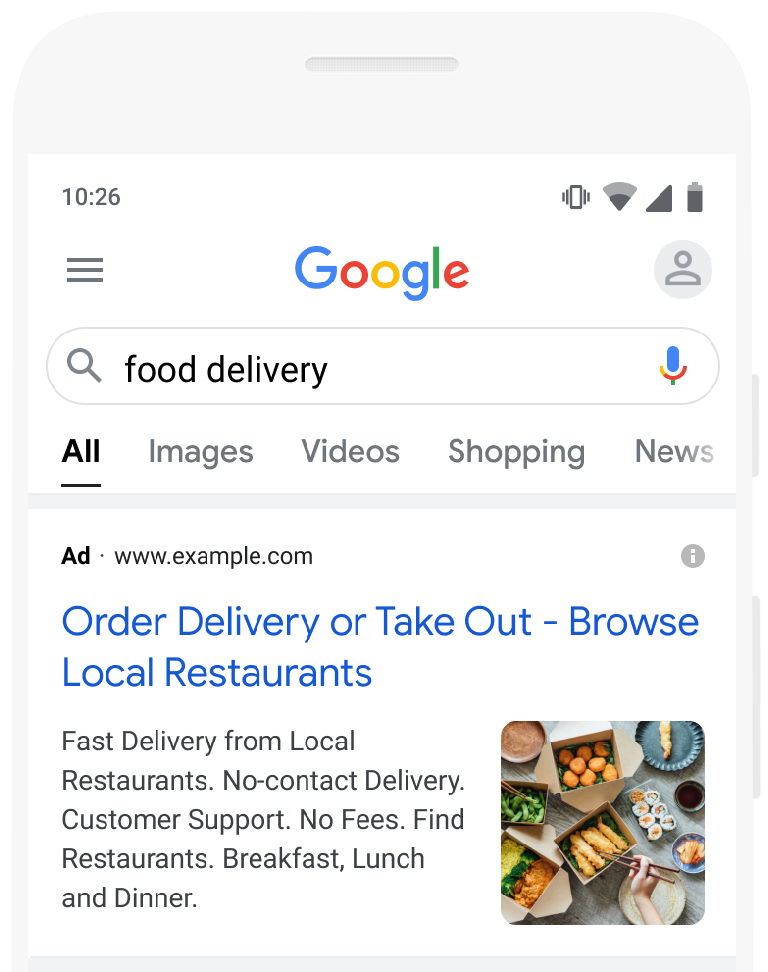
Image assets:
- Increase visual presence
- Improve click-through rate
- Strengthen brand identity
Verdict: Apply.
This is a good, low-risk improvement.
5. Use Display Expansion
This suggests expanding your Search campaign to show ads on the Display Network.
Display traffic:
- Is less intent-driven
- Converts differently
- Often has lower lead quality
If you’re already maxing out Search volume, testing display expansion can make sense.
If your Search campaigns are not fully optimized yet?
Dismiss.
Verdict: Case-by-case. Test cautiously.
6. Add Broad Match Keywords
This is one of Google’s most aggressive pushes.
Google suggests converting exact/phrase keywords into broad match.
Broad match:
- Expands search reach
- Leverages machine learning
- Requires strong conversion tracking
Blindly applying broad match can:
- Increase irrelevant traffic
- Inflate spend
- Lower lead quality
A smarter way to test broad match is via experiments:
- Split budget 50/50
- Compare results
- Keep only what performs
Verdict: Test strategically. Never auto-apply blindly.
7. Raise Your Budget
Google frequently suggests increasing your daily budget.
They’ll estimate:
- Additional clicks
- Potential conversions
- Projected lift
But you already know your budget constraints.
If you want to raise spend, you don’t need Google to tell you.
Verdict: Ignore unless you’ve already decided to scale.
8. Add New Keywords
This recommendation can be surprisingly useful.
Google suggests additional keywords related to your campaigns.
Some will be irrelevant.
Some will be excellent.
Before applying:
- Review intent carefully
- Adjust match type
- Place in correct ad groups
Don’t accept blindly—edit before applying.
Verdict: Review manually. Often valuable.
9. Create a Performance Max Campaign
Performance Max
Google strongly promotes Performance Max (PMax).
Why?
Because it:
- Expands reach across all Google channels
- Automates bidding
- Centralizes targeting
In many accounts, PMax performs well—especially when:
- Conversion tracking is solid
- Budget is sufficient
- Brand is established
But it reduces visibility and control.
Verdict: Worth testing. Not mandatory for every account.
10. Add Conversion Values
Google often recommends assigning dollar values to conversions.
For example:
- Phone call = $50
- Form submission = $30
This enables:
- Maximize Conversion Value bidding
- Better profitability modeling
Even if you’re using Maximize Conversions, having values improves reporting depth.
Verdict: Strongly recommended.
11. Set a Target CPA
If you’re running Maximize Conversions, Google may recommend adding a Target CPA.
This adds control over:
- Cost per lead
- Bidding aggressiveness
Be careful:
Google often pairs this with a suggestion to raise your budget.
You can apply Target CPA without raising spend.
Verdict: Useful when stable conversion data exists.
12. Enable Automatically Created Assets
Google can auto-generate headlines and descriptions from your landing page.
This increases ad strength but reduces messaging control.
If you:
- Struggle with ad copy
- Need help expanding variations
It may help.
If you:
- Want full creative control
Dismiss.
Verdict: Optional. Depends on your copy strategy.
13. Add Business Logo Asset
Adding a logo enhances ad appearance and brand recognition.
Verdict: Apply.
Low risk, potential brand lift.
14. Improve Performance Max Asset Groups
If you’re running Performance Max, Google may suggest:
- More images
- More videos
- Additional headlines
More assets give machine learning more combinations.
If you have high-quality creative available:
Apply.
If not:
Don’t add low-quality filler content just to increase score.
Verdict: Improve only if you can maintain quality.
15. Add Sitelinks
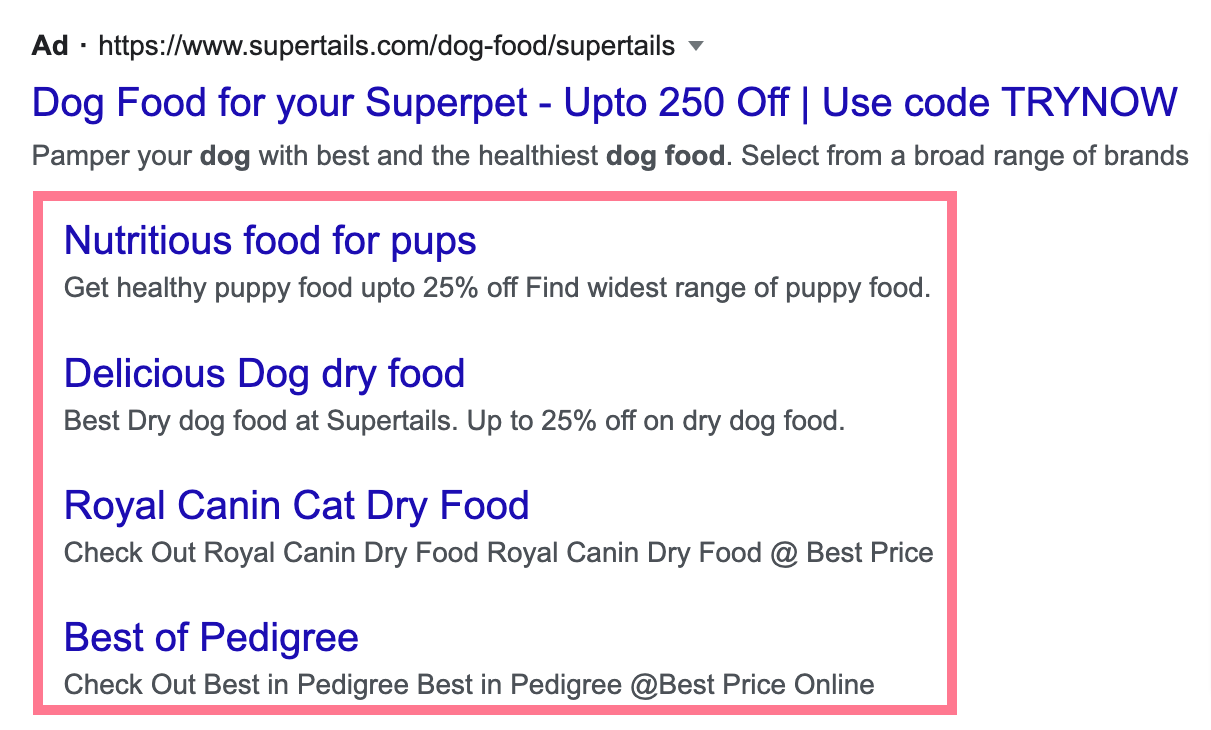
Sitelinks:
- Improve CTR
- Increase SERP footprint
- Direct traffic to specific pages
If your website has multiple useful pages:
Apply.
If you only have a one-page site:
Not relevant.
Verdict: Apply when site structure supports it.
Auto-Apply Recommendations: Should You Turn It On?
Google now allows auto-apply for many recommendations.
This means:
When a recommendation appears, it applies automatically.
Categories include:
- Optimized ad rotation
- Remove redundant keywords
- Remove non-serving keywords
- Upgrade conversion tracking
- Some bidding adjustments
Some of these are harmless and save time.
Others—like broad match expansion or budget increases—should never be auto-applied without review.
Best practice:
Turn on low-risk hygiene auto-applies.
Keep strategic decisions manual.
The Whack-a-Mole Effect
One frustrating aspect of recommendations:
They return.
Even after dismissal, many reappear weeks later.
Managing recommendations becomes an ongoing process.
Optimization score becomes less about perfection—and more about intelligent filtering.
What Recommendations Reveal About Google’s Direction
After reviewing dozens of accounts and speaking with many reps, a few themes stand out:
1. Automation Is the Priority
Google pushes:
- Broad match
- Performance Max
- Automated bidding
- Automatically created assets
2. Budget Expansion Is Encouraged
Many recommendations nudge toward higher spend.
3. Simplification Over Granularity
Google prefers:
- Fewer campaigns
- Broader targeting
- Machine learning control
The platform is moving away from manual micro-management.
How to Approach Recommendations Strategically
Instead of reacting emotionally to optimization score, follow this framework:
Apply:
- GA4 upgrades
- Advertiser verification
- Image assets
- Logo assets
- Sitelinks
- Conversion value tracking
Review Carefully:
- New keywords
- Target CPA adjustments
- Performance Max creation
Test Carefully:
- Broad match keywords
- Display expansion
Usually Dismiss:
- Automatic budget increases
- Fully automated asset creation (if you prefer control)