
The short answer is: yes, but only partially.
GoDaddy does allow some basic tracking through Google Analytics, which can help you track things like form submissions or visits to a thank-you page. But if you want more advanced conversion tracking — especially tracking phone calls from your website — GoDaddy’s website builder has some major limitations.
In this post, I’ll explain what you can track, what you probably can’t track, and when it might make sense to move away from GoDaddy if you’re serious about Google Ads.
The Problem With Google Ads Tracking on GoDaddy Websites
When you’re running Google Ads, conversion tracking is extremely important.
You don’t just want to know how many people clicked your ads. You want to know what happened after the click.
For example:
- Did someone submit a contact form?
- Did someone visit a thank-you page?
- Did someone call your business?
- Which keywords, ads, and campaigns are producing real leads?
That conversion data helps you make better decisions inside Google Ads. Without it, you’re often guessing.
The challenge with GoDaddy’s website builder is that it does not give you full control over your website’s code. In many cases, you cannot easily add tracking scripts to the head section of your website, which is where many Google Ads and third-party tracking scripts need to be placed.
That creates a problem if you want to install more advanced tracking tools.
What GoDaddy Does Allow: Google Analytics Tracking
GoDaddy’s website builder does allow you to add a Google Analytics tracking ID.
Inside the GoDaddy website editor, you can typically go to your site settings and add your Google Analytics measurement ID. Once that is connected, Google Analytics can start collecting basic website data.
This can allow you to track certain website actions, such as:
- Form submissions
- Visits to specific pages
- Visits to a thank-you page
- Basic website traffic and engagement
Once those events are being tracked in Google Analytics, you may be able to import them into Google Ads as conversions.
For many small advertisers, this may be enough to get started.
For example, if the main conversion on your website is a contact form submission, and GoDaddy’s built-in form tracking works properly with Google Analytics, then you may be able to track those form submissions and import them into Google Ads.
That gives you at least some conversion data to work with.
What You Can Track on a GoDaddy Website
With the basic Google Analytics setup, you may be able to track:
1. Contact Form Submissions
If someone fills out a form on your GoDaddy website, that may be trackable through Google Analytics.
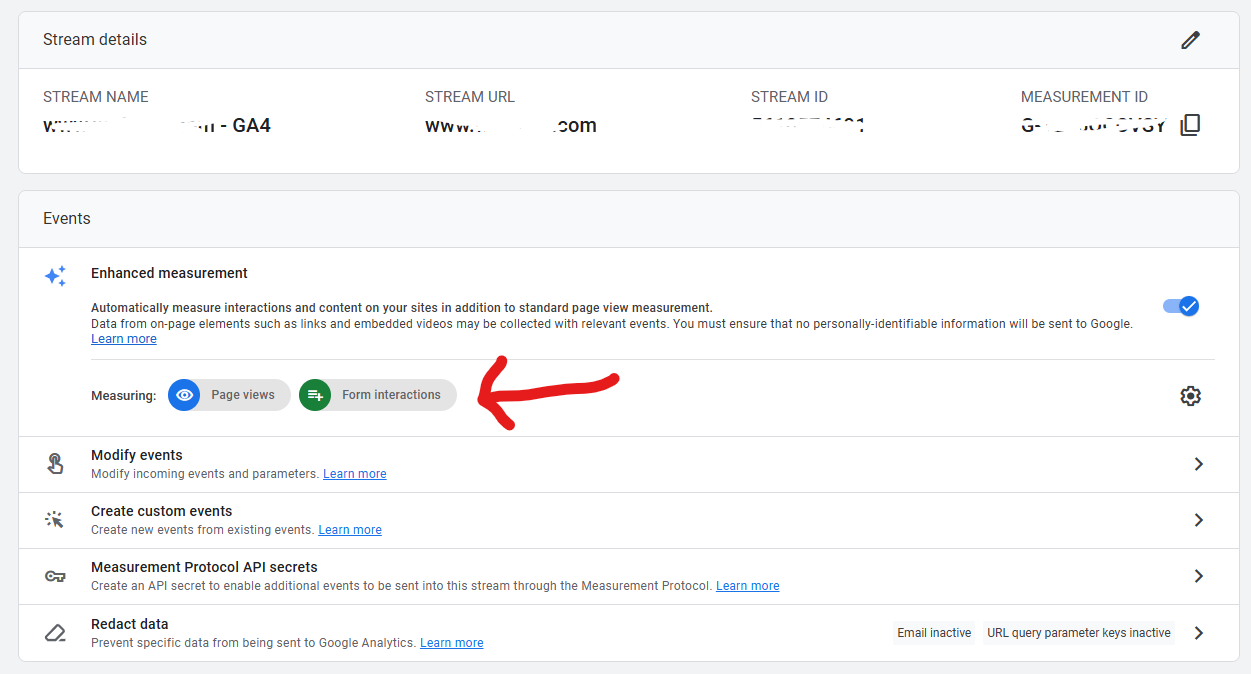
This depends on how the form works and whether Analytics is able to capture the event properly. But in many cases, this is one of the more realistic conversion actions to track on a GoDaddy website. To get this to work, you’d need to turn on “Form Interactions” in your web stream settings in Google Analytics as shown in image below. I’ve been having some trouble with this lately so not even sure if this works!
2. Thank-You Page Visits
If your form redirects users to a thank-you page after submission, you can often track visits to that thank-you page as a conversion.
This is one of the simplest conversion tracking methods because the conversion is based on a pageview.
For example:
- Someone clicks your Google Ad
- They land on your website
- They fill out a contact form
- They are redirected to
/thank-you - Google Analytics records the thank-you page visit
- You import that event into Google Ads as a conversion
If your GoDaddy site supports this flow, it can be a decent basic tracking setup. This can also be a dead end since GoDaddy Website Builder does not currently offer a Thank You Page Redirect.
3. Calls Directly From Google Ads
You can also track phone calls that happen directly from your Google Ads call assets.
Call assets are phone numbers that can appear with your ads, especially on mobile devices. When someone taps the call button directly from the ad, Google Ads can track that call inside the ad platform.
This type of call tracking does not rely on your GoDaddy website because the call happens directly from the ad and before they visit the website

What You Probably Can’t Track: Website Phone Calls
The biggest limitation with GoDaddy websites is tracking phone calls that happen after someone lands on your website.
This is a major issue for many local businesses.
For example, someone might:
- Click your Google Ad
- Visit your GoDaddy website
- Look around for a few seconds
- Tap the phone number on your website
- Call your business
That is often a very valuable lead.
But with GoDaddy’s website builder, you may not be able to properly track that call as a Google Ads conversion.
Why?
Because Google Ads phone call tracking from a website usually requires a script. Google uses this script to dynamically replace your phone number with a Google forwarding number. That forwarding number allows Google Ads to connect the phone call back to the ad click.
The problem is that GoDaddy’s website builder generally does not allow you to add the necessary script in the correct place on the website.
So while you may be able to display your phone number on the site, you probably won’t be able to use Google’s website call conversion tracking properly.
Why Call Tracking Matters So Much
For some businesses, this limitation may not be a big deal.
But for many service-based businesses, phone calls are one of the most important conversion actions.
This is especially true for industries like:
- Contractors
- Plumbers
- HVAC companies
- Lawyers
- Medical offices
- Home service businesses
- Local service providers
- Emergency services
- Appointment-based businesses
In these industries, a lot of people don’t want to fill out a form. They want to call.
If those website calls are not being tracked, your Google Ads account may underreport conversions. That can make your campaigns look worse than they really are.
It can also make optimization harder because Google Ads may not know which keywords, ads, or campaigns are generating phone leads.
That means you could end up cutting campaigns that are actually working — simply because the conversions are not being tracked.
What About CallRail or Other Call Tracking Tools on Godaddy sites?
Many advertisers use third-party call tracking tools like CallRail to track phone calls from their website.
These tools usually work by placing a script on your website. The script dynamically swaps phone numbers based on where the visitor came from, such as Google Ads, organic search, direct traffic, or another source.
This is very useful when you want to know which marketing channels are driving phone calls.
But again, the issue with GoDaddy’s website builder is that you may not be able to install the required tracking script properly.
So even if you want to use a tool like CallRail, GoDaddy’s website builder may prevent you from setting it up the way you need.
That’s one of the main reasons GoDaddy websites are not ideal for advertisers who need accurate conversion tracking.
Is GoDaddy Good Enough for Small Google Ads Campaigns?
It depends.
If you are a small advertiser with a limited budget, and you already have a GoDaddy website, you may be able to get by with basic tracking.
For example, you might track:
- Contact form submissions/Thank-you page visits
- Calls directly from Google Ads call assets
That may give you enough data to understand whether your campaign is generating some leads.
But you should understand the limitations.
If a large percentage of your leads come from people calling the phone number on your website, your conversion data may be incomplete.
That means your Google Ads account may not show the full picture.
When GoDaddy Becomes a Problem for Google Ads
GoDaddy’s website builder becomes more of a problem when you are spending a meaningful amount of money on Google Ads.
If you are investing hundreds or thousands of dollars per month into advertising, you probably want better tracking.
At that point, you may need:
- Google Ads conversion tracking installed directly
- Google Tag Manager access
- Website call conversion tracking
- CallRail or another call tracking platform
- Better landing page control
- More flexible form tracking
- More control over scripts and custom code
These are all areas where GoDaddy’s website builder can be limiting.
The more serious you are about Google Ads, the more important it becomes to have a website platform that gives you full control over tracking.
Why WordPress Is Usually a Better Option
For advertisers who need better tracking, WordPress is often a better choice.
With a WordPress website, you typically have much more control over:
- Adding scripts to the site
- Installing Google Tag Manager
- Setting up Google Ads conversion tracking
- Installing CallRail
- Creating dedicated landing pages
- Tracking forms, buttons, and phone calls
- Customizing thank-you pages
- Improving SEO and site structure
WordPress is not the only option, but it is a flexible platform that works well for many businesses running Google Ads.
If you’re spending a reasonable amount on advertising, it often makes sense to use a website platform that supports proper conversion tracking.
Need Help With Google Ads or Website Tracking?
If you’re running Google Ads and aren’t sure whether your conversions are being tracked correctly, it’s worth reviewing your setup.
A proper tracking setup can help you understand which campaigns are working, which leads are coming from Google Ads, and where your budget is producing real results.
I work with businesses on Google Ads management, conversion tracking, and website setup. If you need help improving your tracking or moving to a more flexible website platform, feel free to reach out.